← Back to blog # How to Use the Apify MCP in Claude to Query Spanish Tax Authority Administrative Doctrine
Learn how to connect the Apify MCP to Claude and use the legaltech/hacienda actor to query TEAC tax administrative doctrine, DGT binding rulings, and historical resolutions directly from the chat.
Querying Spanish tax administrative doctrine — whether from the TEAC, the regional Economic-Administrative Tribunals, or the DGT — means navigating multiple official search engines with complex interfaces. In this guide you will learn how to connect the **Apify MCP** to **Claude** so that the assistant itself searches and analyses the doctrine for you, all from a simple conversation.
## 🏛️ What Sources Does the `legaltech/hacienda` Actor Cover?
The [`legaltech/hacienda`](https://apify.com/legaltech/hacienda?fpr=legaltech) actor automates searches across three official sources of Spanish tax administrative doctrine from the Ministry of Finance:
- **DYCTEA** — binding and non-binding criteria from the TEAC and the regional TEAR tribunals. Covers the central TEAC and all Regional Economic-Administrative Tribunals.
- **DGT** — Binding Rulings from the Directorate General of Taxes. Only binding rulings (V-XXXX-YY).
- **TEAC Histórica** — the classic search engine with historical resolutions classified by tax concept and Vocalía.
## 🤖 Tutorial: Connect Apify to Claude and Start Querying
Thanks to the **Model Context Protocol (MCP)**, Claude can connect to external tools such as Apify. This means that, instead of navigating the official Hacienda search engines, you can ask Claude in natural language to retrieve the doctrine you need and work with it.
### **Step 1: Create an Apify Account and Get Your Token**
The first thing you need is an Apify account. The free plan provides enough monthly usage credits to run the actor.
<br>
<a href="https://console.apify.com/sign-up?fpr=legaltech" target="_blank" rel="noopener noreferrer" style="display: inline-block; padding: 10px 20px; font-size: 16px; font-weight: bold; text-align: center; text-decoration: none; color: #ffffff; background-color: #6B46C1; border-radius: 8px;">
Create a free Apify account
</a>
<br>
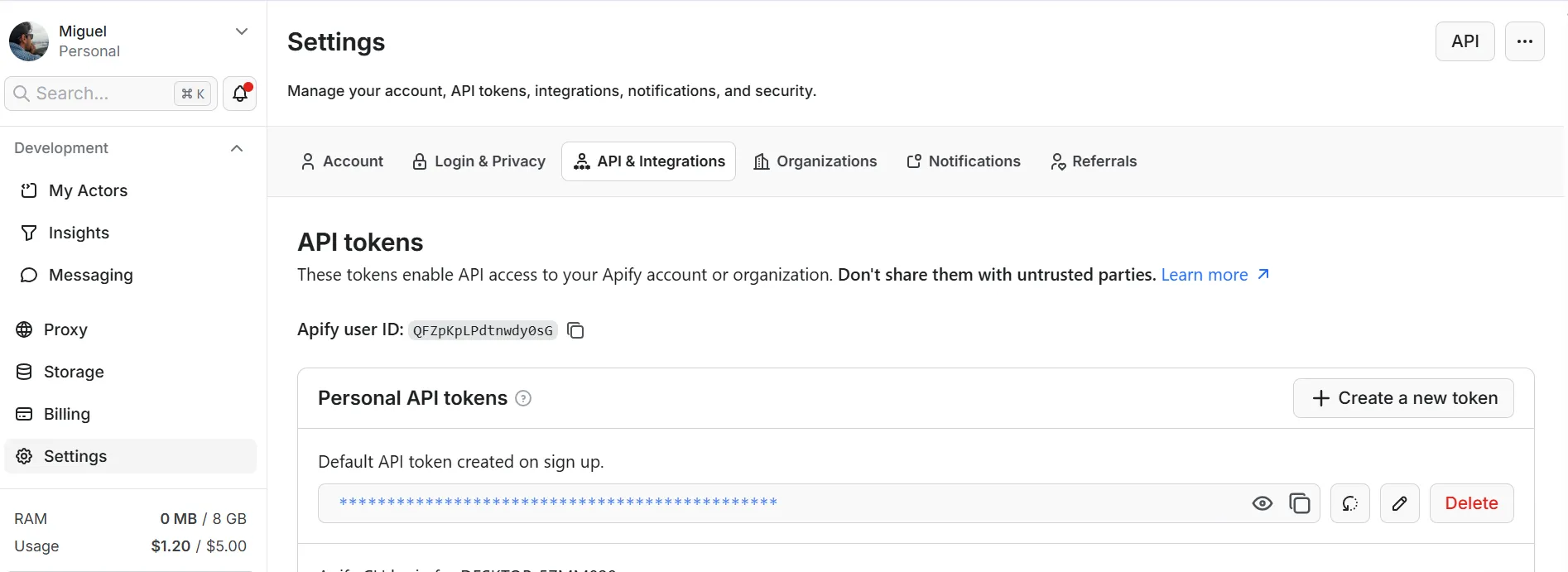
Once inside, go to **Settings → API & Integrations**, click **Create new token**, and copy it.

### **Step 2: Download Claude Desktop**
Download and install the Claude Desktop app from [claude.com/download](https://claude.com/download). This desktop version is the one that allows you to add external MCP connectors.
### **Step 3: Install the Apify Connector and Paste Your Token**
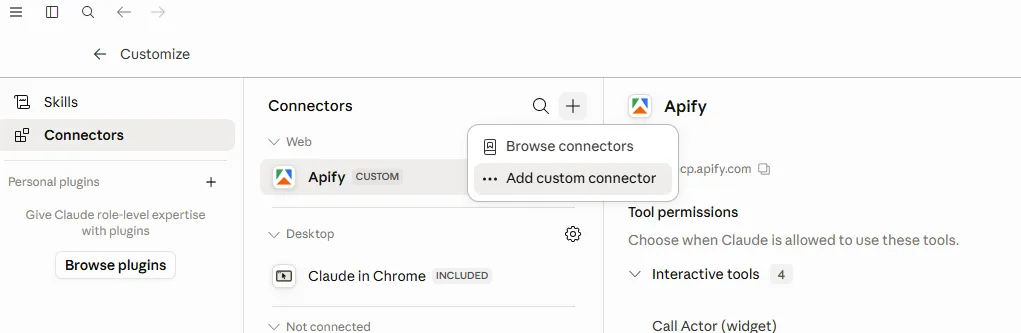
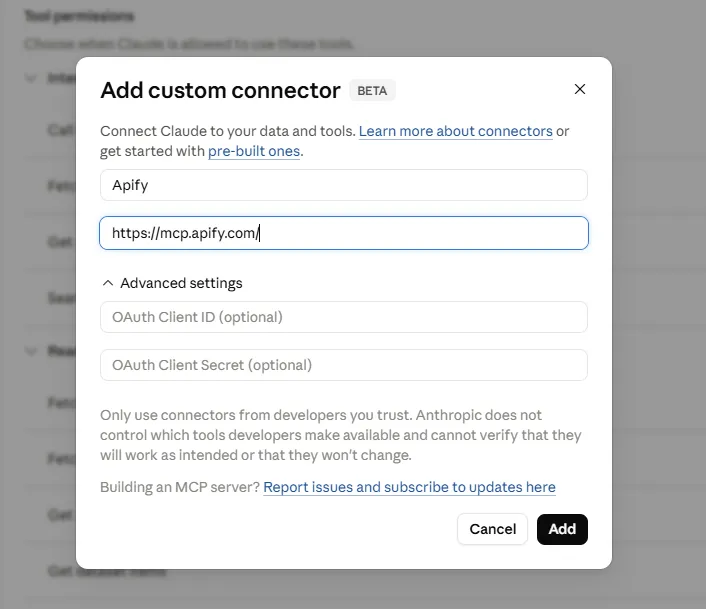
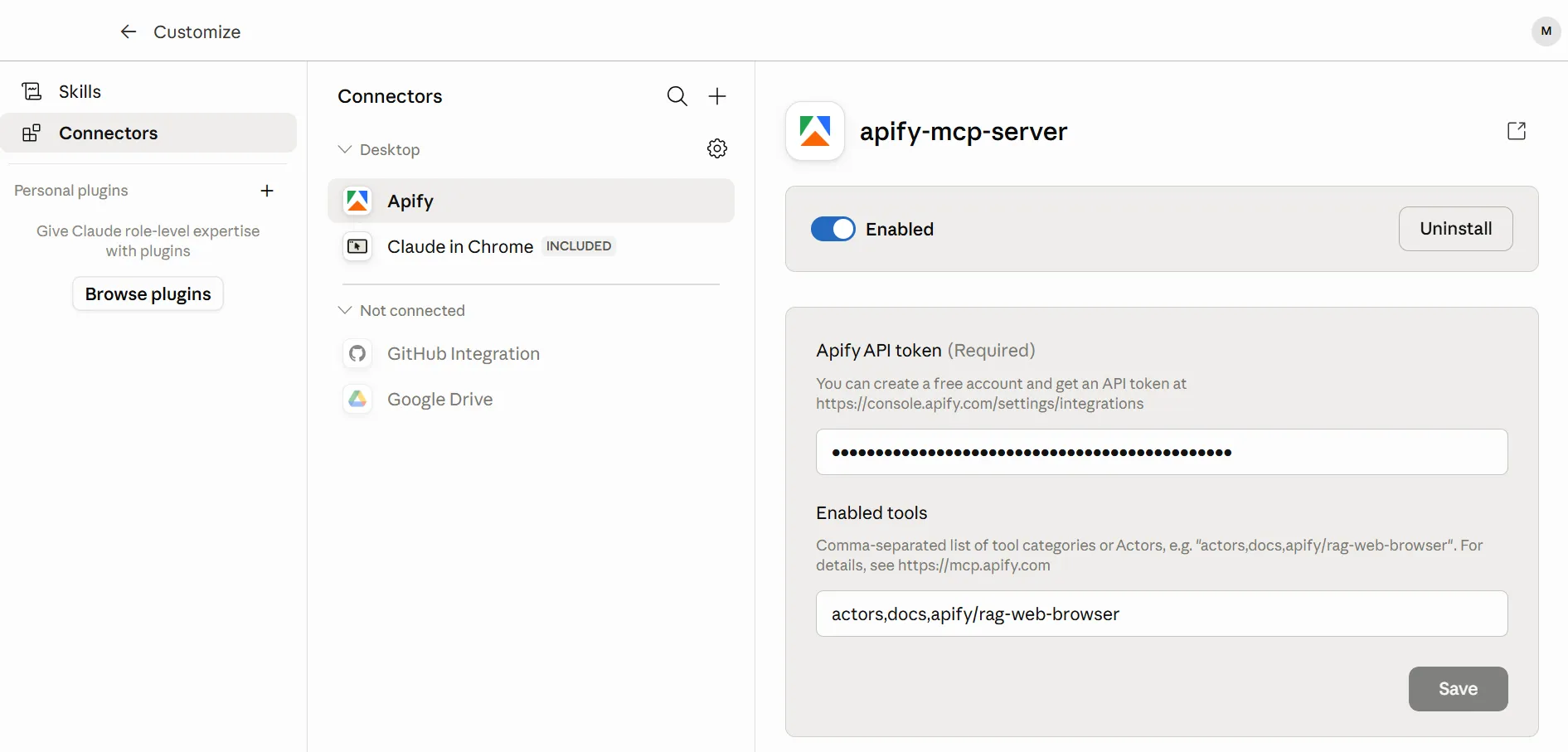
Open Claude Desktop, go to the connector settings, and select **Add custom connector**. Enter the Apify MCP URL and paste the token you copied in the previous step.


https://mcp.apify.com/?tools=actors,docs,runs,storage,tasks,legaltech/cendoj,legaltech/hacienda,legaltech/tribunal-constitucional,legaltech/tjue,legaltech/fiscalia,legaltech/catastro,legaltech/ine,legaltech/aepd

With this you now have access to all LegalTech actors from Claude: `legaltech/hacienda`, `legaltech/cendoj`, `legaltech/tribunal-constitucional`, and many more.
> 📱 **Bonus:** Once the connector is set up in your account, you can also use it from the **Claude mobile app**. The connector is linked to your account, so you can query Hacienda doctrine from any device without any additional configuration.
### **Step 4: Query Administrative Doctrine from the Chat**
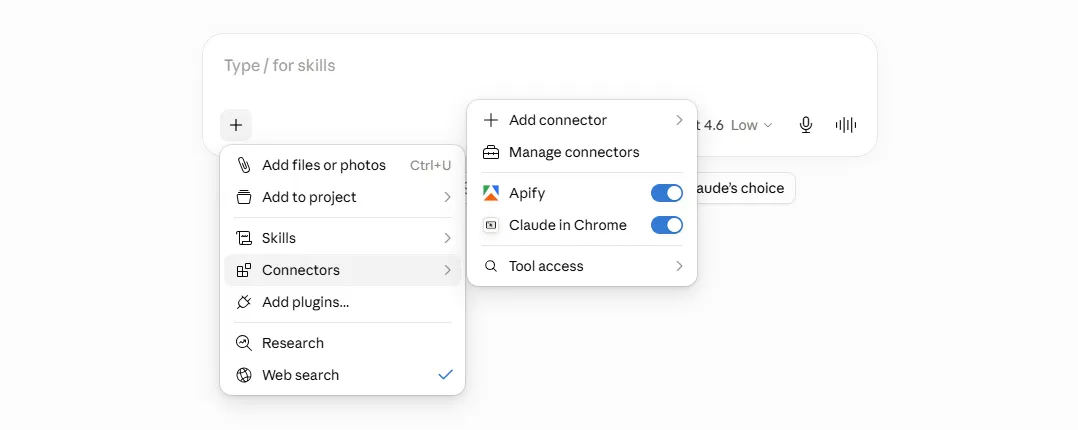
Once the connector is configured, open the Claude chat and verify that Apify appears as an available tool.

Now you can ask Claude in natural language to find the doctrine you need. For example:
> **Use the legaltech/hacienda actor and find DGT binding rulings on the taxation of cryptocurrencies under personal income tax**
> **Use the legaltech/hacienda actor and give me the latest TEAC resolutions on the deductibility of financial expenses**
> **Use the legaltech/hacienda actor and search DYCTEA for criteria on the tax liability of company directors**
Claude will run the actor with the criteria you specified, automatically selecting the most appropriate source (DYCTEA, DGT, or TEAC Histórica), and return the results ready for analysis.
### **Step 5: Analyse the Doctrine from the Chat**
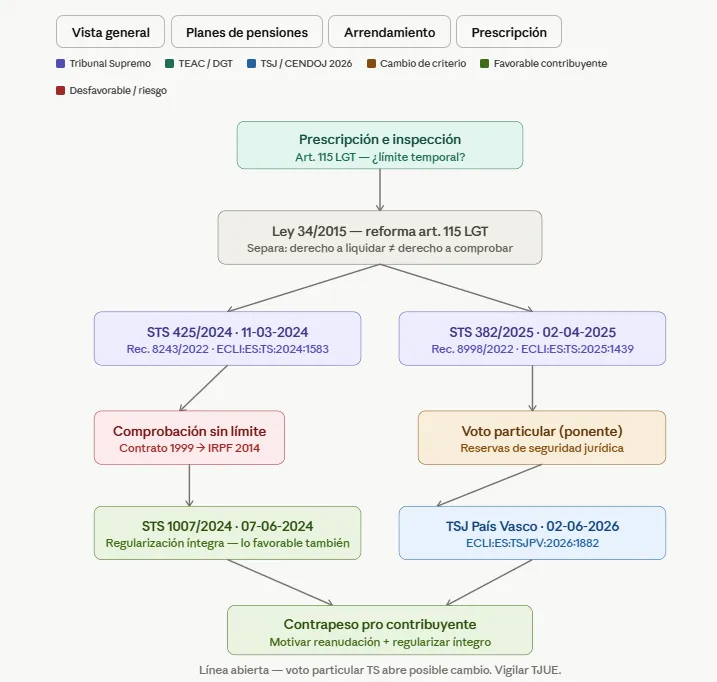
Once Claude has the results, you can keep working with them without leaving the conversation. Beyond answering questions, Claude can generate **conceptual graphs** that connect tax resolutions with each other and link them to related case law, letting you visualise the evolution of a criterion and the relationships between sources at a glance.

Some examples of what you can ask:
- *Summarise the criterion of each binding ruling in two sentences.*
- *Has the DGT's position on this matter changed in the last three years?*
- *Identify which of these TEAC resolutions are binding in administrative proceedings.*
- *Generate a table with the reference, date, and main criterion of each resolution.*
- *What recurring arguments do the tribunals use in these cases?*
The analysis is a conversation: you refine your questions and Claude responds drawing on the doctrine it retrieved directly from the official Hacienda sources.
Published on Thu Jun 25 2026 00:00:00 GMT+0000 (Coordinated Universal Time) by Miguel Gonzalez Herrera
Querying Spanish tax administrative doctrine — whether from the TEAC, the regional Economic-Administrative Tribunals, or the DGT — means navigating multiple official search engines with complex interfaces. In this guide you will learn how to connect the Apify MCP to Claude so that the assistant itself searches and analyses the doctrine for you, all from a simple conversation.
🏛️ What Sources Does the legaltech/hacienda Actor Cover?
The legaltech/hacienda actor automates searches across three official sources of Spanish tax administrative doctrine from the Ministry of Finance:
DYCTEA — binding and non-binding criteria from the TEAC and the regional TEAR tribunals. Covers the central TEAC and all Regional Economic-Administrative Tribunals.
DGT — Binding Rulings from the Directorate General of Taxes. Only binding rulings (V-XXXX-YY).
TEAC Histórica — the classic search engine with historical resolutions classified by tax concept and Vocalía.
🤖 Tutorial: Connect Apify to Claude and Start Querying
Thanks to the Model Context Protocol (MCP), Claude can connect to external tools such as Apify. This means that, instead of navigating the official Hacienda search engines, you can ask Claude in natural language to retrieve the doctrine you need and work with it.
Step 1: Create an Apify Account and Get Your Token
The first thing you need is an Apify account. The free plan provides enough monthly usage credits to run the actor.
Once inside, go to Settings → API & Integrations, click Create new token, and copy it.
Step 2: Download Claude Desktop
Download and install the Claude Desktop app from claude.com/download. This desktop version is the one that allows you to add external MCP connectors.
Step 3: Install the Apify Connector and Paste Your Token
Open Claude Desktop, go to the connector settings, and select Add custom connector. Enter the Apify MCP URL and paste the token you copied in the previous step.
With this you now have access to all LegalTech actors from Claude: legaltech/hacienda, legaltech/cendoj, legaltech/tribunal-constitucional, and many more.
📱 Bonus: Once the connector is set up in your account, you can also use it from the Claude mobile app. The connector is linked to your account, so you can query Hacienda doctrine from any device without any additional configuration.
Step 4: Query Administrative Doctrine from the Chat
Once the connector is configured, open the Claude chat and verify that Apify appears as an available tool.
Now you can ask Claude in natural language to find the doctrine you need. For example:
Use the legaltech/hacienda actor and find DGT binding rulings on the taxation of cryptocurrencies under personal income tax
Use the legaltech/hacienda actor and give me the latest TEAC resolutions on the deductibility of financial expenses
Use the legaltech/hacienda actor and search DYCTEA for criteria on the tax liability of company directors
Claude will run the actor with the criteria you specified, automatically selecting the most appropriate source (DYCTEA, DGT, or TEAC Histórica), and return the results ready for analysis.
Step 5: Analyse the Doctrine from the Chat
Once Claude has the results, you can keep working with them without leaving the conversation. Beyond answering questions, Claude can generate conceptual graphs that connect tax resolutions with each other and link them to related case law, letting you visualise the evolution of a criterion and the relationships between sources at a glance.
Some examples of what you can ask:
Summarise the criterion of each binding ruling in two sentences.
Has the DGT’s position on this matter changed in the last three years?
Identify which of these TEAC resolutions are binding in administrative proceedings.
Generate a table with the reference, date, and main criterion of each resolution.
What recurring arguments do the tribunals use in these cases?
The analysis is a conversation: you refine your questions and Claude responds drawing on the doctrine it retrieved directly from the official Hacienda sources.
How to Use the Apify MCP with a Local Model (Ollama) to Search CENDOJ Rulings
Learn how to search Spanish CENDOJ rulings in natural language with a language model that runs on your own computer: Ollama, AnythingLLM and the Apify MCP, without sending your conversations or documents to Claude or ChatGPT.
How to Use the Apify MCP in Claude to Find Which Cadastral Parcel You Are In and Look Up Its Data
Learn how to connect the Apify MCP to Claude and use the legaltech/catastro actor to get a parcel's cadastral reference from your coordinates or an address, and look up its official data without going through the Spanish Cadastre website.
How to Use the Apify MCP in Claude to Cross-Reference Spanish Mortgage and Foreclosure Data from the INE
Learn how to connect the Apify MCP to Claude and use the legaltech/ine actor to cross-reference Spain’s Mortgage Statistics and Mortgage Foreclosure Statistics from the INE, and reach the provincial figure no article publishes.
How to Use the Apify MCP in ChatGPT to Access LegalTech Legal Connectors
Learn how to use LegalTech legal connectors from a free ChatGPT account: enable Developer Mode, add the Apify MCP (@Apify), and query Fiscalía, CENDOJ, Hacienda, Property Registry, and more directly from the chat.
How to Use the Apify MCP in Claude to Query Doctrine from the Spanish State Prosecutor Office
Learn how to connect the Apify MCP to Claude and use the legaltech/fiscalia actor to search Circulares, Instrucciones and Consultas from the Spanish State Prosecutor Office directly from the chat, simply by asking in natural language.
How to Use the Apify MCP in Claude to Query Spanish Tax Authority Administrative Doctrine
Learn how to connect the Apify MCP to Claude and use the legaltech/hacienda actor to query TEAC tax administrative doctrine, DGT binding rulings, and historical resolutions directly from the chat.
We use Google Analytics cookies to analyze traffic and improve your experience. You can accept them, reject them, or read our Privacy & Cookies policy. Privacy & Cookies.