← Back to blog # How to Use the Apify MCP in Claude to Find Which Cadastral Parcel You Are In and Look Up Its Data
Learn how to connect the Apify MCP to Claude and use the legaltech/catastro actor to get a parcel's cadastral reference from your coordinates or an address, and look up its official data without going through the Spanish Cadastre website.
Querying the Spanish Cadastre by hand means opening the Sede Electrónica del Catastro, wrestling with the map viewer or the street-and-number search, and —if what you want is the full record— already having the parcel's cadastral reference. And if you are out in the field and all you know is where you are standing, there is no convenient way to get to the data. In this guide you will see how the **Apify MCP** connected to **Claude** does that whole journey for you: from a set of coordinates or an address to the cadastral reference and the parcel's official data, all from a single conversation.
> 💬 **Prefer ChatGPT over Claude?** You can set up this same Apify MCP connector in ChatGPT by following [this tutorial](https://www.legaltechnologybootcamp.com/en/blog/chatgpt-apify-mcp-conectores-juridicos/).
## 🗺️ What Does the `legaltech/catastro` Actor Do?
The [`legaltech/catastro`](https://apify.com/legaltech/catastro?fpr=legaltech) actor is a natural-language layer over two official sources from Spain's Directorate-General for Cadastre:
1. **Direct queries to the Cadastre's web services** (`catastroQueries`). From **geographic coordinates**, a **cadastral reference**, or **municipality + street + number**, the actor calls the Cadastre's public services (OVCCallejero and the cartography query) and returns the full cadastral reference, the location, the use or purpose, the surface area, the year of construction where applicable, the participation coefficient, and the link to the official graphical record. Each result includes the `operacion` that was run, the `parametros`, the `url`, and the `respuesta`, with a stable link back to the source so you can cite it.
2. **Monitoring of the BOE's Single Edictal Board (TEU)** (`searchTerms`). It locates the Cadastre's notices and communications published on the TEU when personal notification to the interested party was not possible —proposed resolutions in valuation procedures, correction of discrepancies, cadastral regularization—. You can search by NIF/DNI, cadastral reference, file number, name, or municipality.
This guide focuses on the first flow: getting to the parcel and its data.
## 📍 The Real Use Case: "Which Cadastral Parcel Am I In?"
The starting point is a single prompt:
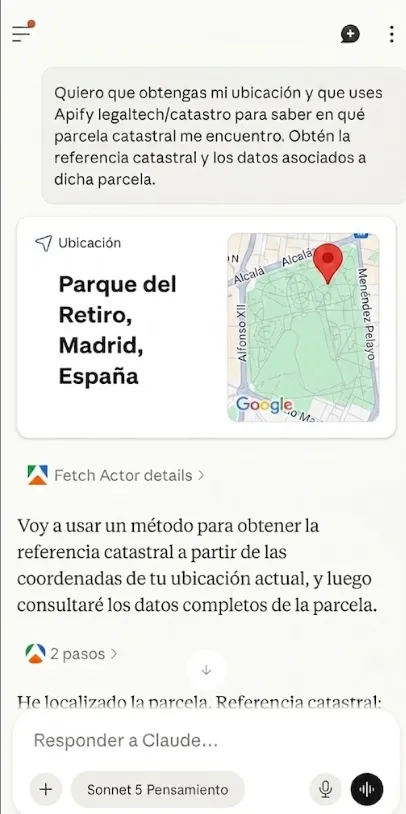
> **I want you to get my location and use Apify legaltech/catastro to find out which cadastral parcel I am in. Get the cadastral reference and the data associated with that parcel.**

Claude gets the device's location (in the example, Madrid's Retiro Park), converts it to geographic coordinates, and runs the actor. The journey has two chained steps: first it resolves the **cadastral reference from the coordinates** —the Cadastre query that returns the parcel containing a point—, and with that reference it runs a **second query** to bring back the full descriptive record.

<div style="border:3px solid #000;border-radius:12px;padding:22px 20px 18px;background:#fff;margin:26px 0;overflow-x:auto;">
<div style="font-family:'IBM Plex Mono',monospace;font-size:11px;letter-spacing:.08em;text-transform:uppercase;color:#6b6558;margin-bottom:4px;">Cadastral reference</div>
<div style="font-family:'IBM Plex Mono',monospace;font-weight:700;font-size:18px;color:#1a2332;margin-bottom:16px;">2043581VK4724C0001WU</div>
<div style="font-size:13px;line-height:1.9;color:#1a2332;min-width:320px;">
<div><strong>Location:</strong> Plaza Independencia 7, Parque del Retiro, 28001 Madrid (Madrid)</div>
<div><strong>Use:</strong> Urbanization and landscaping works, undeveloped land</div>
<div><strong>Parcel surface area:</strong> 1,092,364 m²</div>
<div><strong>Municipality (INE code):</strong> Madrid (28-079)</div>
<div><strong>Participation coefficient:</strong> 100%</div>
</div>
<div style="font-size:10.5px;color:#6b6558;margin-top:16px;">Source: Directorate-General for Cadastre, OVCCallejero services. Queried via sedecatastro.gob.es.</div>
</div>
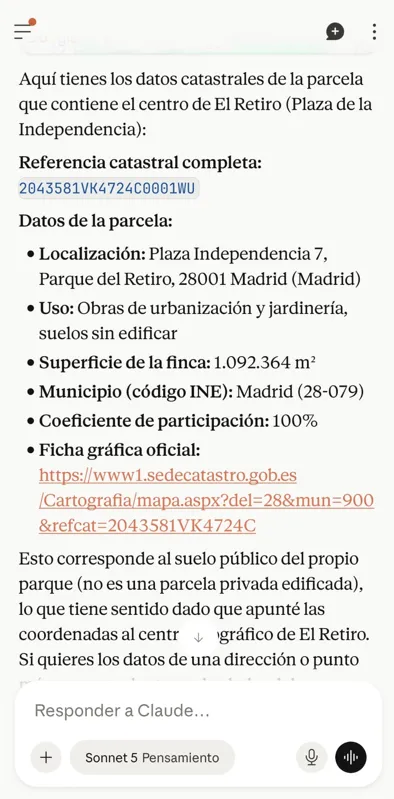
The result corresponds to the **park's own public land** —a single parcel of over a million square metres, with a use of "urbanization and landscaping works, undeveloped land" and a participation coefficient of 100%—, not a privately developed property. That makes sense: the coordinates pointed to the geographic centre of El Retiro. If instead of the location you pass a **specific address** (street, number, and municipality) or a **cadastral reference**, you get the record for that property rather than the park's.

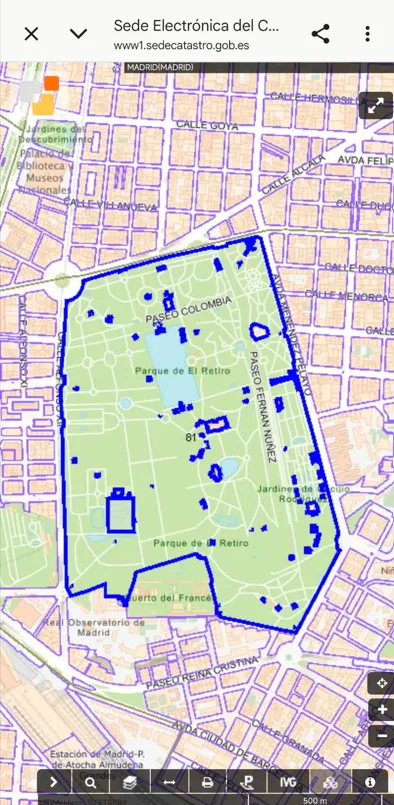
The Cadastre's official graphical record shows the parcel's perimeter over the cartography, and Claude gives you the direct link to open it:
[Open the parcel's graphical record in the Cadastre's map viewer](https://www1.sedecatastro.gob.es/Cartografia/mapa.aspx?del=28&mun=900&refcat=2043581VK4724C)
### Why This Matters for Practitioners
Getting to the exact parcel and its cadastral reference from a point or an address is a constant preliminary step in real-estate work: due diligence on a sale, boundary disputes and demarcation, expropriations, checking the use and surface area recorded in the Cadastre against the title, or the participation coefficient that matters under horizontal property. And the cadastral reference you get here is the same one you need to request a land registry extract, to draft a deed, or for any tax procedure on the property. Doing it from the chat, out in the field, without opening the Cadastre viewer, saves a detour that comes up again and again.
## 🤖 Tutorial: Connect Apify to Claude and Start Querying the Cadastre
Thanks to the **Model Context Protocol (MCP)**, Claude can connect to external tools like Apify. Instead of navigating the Sede Electrónica del Catastro, you can ask Claude in natural language for the parcel and the data you need.
### **Step 1: Open Claude or ChatGPT in Your Browser**
No install needed: go straight to [Claude's connectors settings](https://claude.ai/customize/connectors) and sign in with your account, or to [ChatGPT's connectors settings](https://chatgpt.com/#settings/Connectors) if you'd rather use that. MCP connectors work the same way from the browser as they do from the desktop or mobile apps.
### **Step 2: Connect the Apify MCP (no token needed)**
You no longer need to generate and paste an API token by hand: the Apify connector is authorized directly with OAuth from within Claude.
1. Go to [Customize → Connectors](https://claude.ai/customize/connectors).
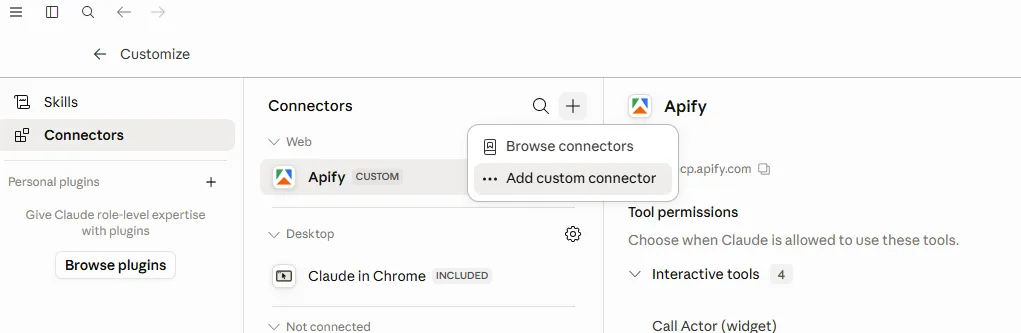
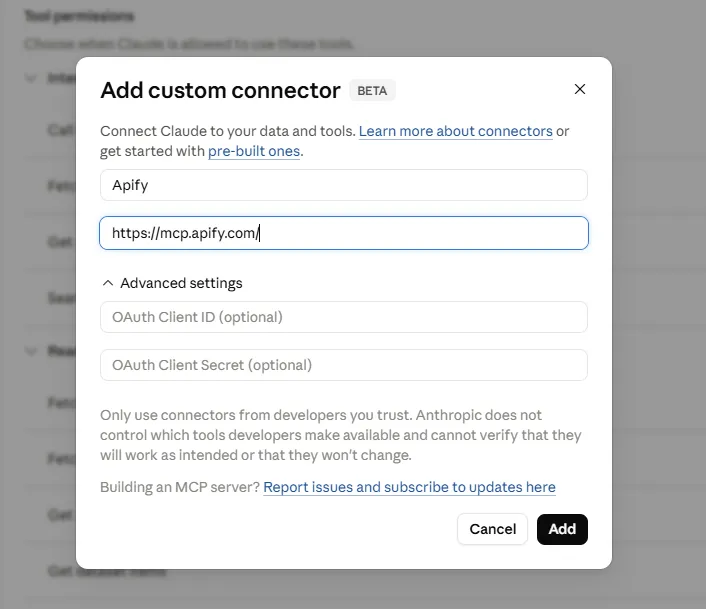
2. Click the **+** button next to Connectors and select **Add custom connector**.
3. Fill in the form with these two fields:
- **Name:** `Apify`
- **MCP Server URL:** `https://mcp.apify.com/?tools=actors,docs,runs,storage,tasks,legaltech/cendoj,legaltech/hacienda,legaltech/tribunal-constitucional,legaltech/tjue,legaltech/fiscalia,legaltech/catastro,legaltech/ine,legaltech/aepd`


4. Click **Add**, open the newly created connector, and click **Connect** to authorize it. If you don't have an Apify account yet, this is the moment to create one — the authorization window will prompt you, and the free plan includes enough monthly usage credits to run the actor.
<br>
<a href="https://console.apify.com/sign-up?fpr=legaltech" target="_blank" rel="noopener noreferrer" style="display: inline-block; padding: 10px 20px; font-size: 16px; font-weight: bold; text-align: center; text-decoration: none; color: #ffffff; background-color: #6B46C1; border-radius: 8px;">
Create a Free Apify Account
</a>
<br>
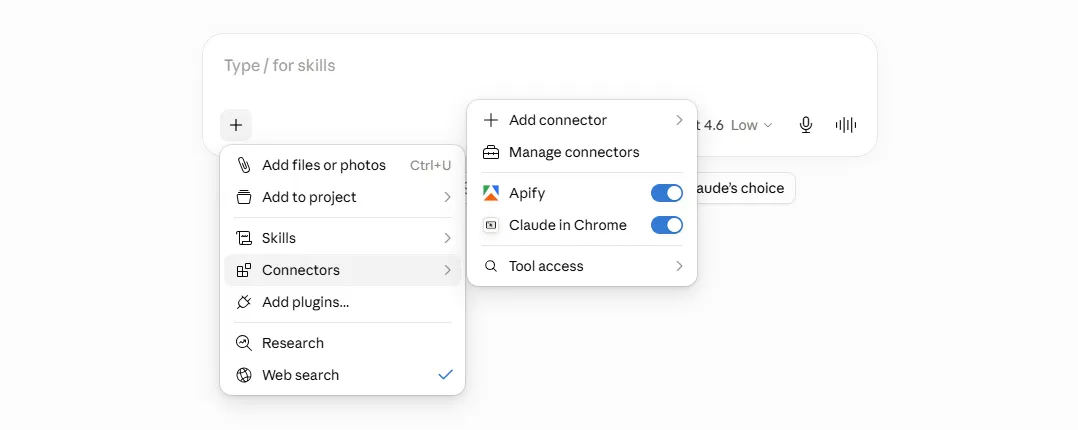
5. To enable the connector in a conversation, click **+** in the chat, hover over **Connectors**, and toggle on **Apify**.
With this done, you now have access to every LegalTech actor from Claude: `legaltech/catastro`, `legaltech/ine`, `legaltech/hacienda`, `legaltech/cendoj`, and many more.
> 📱 **Bonus:** Once the connector is set up on your computer, you can also use it from the **Claude or ChatGPT mobile app**: the connector is tied to your account, so there's nothing left to configure. The example in this article was done from a phone, in fact. If you'd rather set it up straight from your phone, we have a screenshot-by-screenshot walkthrough (in Spanish) at [Instalar Apify en Claude](/es/instalar/).
### **Step 3: Query the Cadastre from the Chat, in Natural Language**
Once the connector is configured, open the Claude chat and confirm that Apify shows up as an available tool.

Now you can ask Claude for the query you need without knowing the names of the Cadastre web-service operations. For example:
> **Use the legaltech/catastro actor and tell me which cadastral parcel I am in based on my location**
> **Use the legaltech/catastro actor and give me the cadastral reference and data for Calle de Alcalá 42, Madrid**
> **Use the legaltech/catastro actor and look up the record for cadastral reference 2043581VK4724C0001WU**
> **Use the legaltech/catastro actor and tell me the surface area, use, and year of construction of this parcel**
> **Use the legaltech/catastro actor and search the BOE's Single Edictal Board for Cadastre notices addressed to this NIF**
Claude will translate your request into the right operation (by coordinates, by cadastral reference, or by address), chain the queries it needs —first the reference, then the record—, and return the data already organized in the conversation, with a link to the source.
### **Step 4: Analyze and Keep Asking from the Chat**
Once Claude has the parcel data, you can keep working with it without leaving the conversation:
- *What is the parcel's surface area and what use is it assigned in the Cadastre?*
- *Give me the link to the graphical record and to the descriptive and graphical query so I can cite them.*
- *Does this parcel have several properties (horizontal property) or is it a single unit?*
- *Compare the cadastral surface area with the one in this land registry extract and tell me whether they match.*
- *Locate the adjoining parcel and give me its cadastral reference.*
- *Build a table with the cadastral reference, address, surface area, and use of these five properties.*
The analysis is a conversation: you keep refining your questions, and Claude keeps answering based on the figure it just pulled directly from the Cadastre's services, saving you the navigation through the viewer and the manual lookup of each reference.
Published on Tue Sep 01 2026 00:00:00 GMT+0000 (Coordinated Universal Time) by Miguel Gonzalez Herrera
Querying the Spanish Cadastre by hand means opening the Sede Electrónica del Catastro, wrestling with the map viewer or the street-and-number search, and —if what you want is the full record— already having the parcel’s cadastral reference. And if you are out in the field and all you know is where you are standing, there is no convenient way to get to the data. In this guide you will see how the Apify MCP connected to Claude does that whole journey for you: from a set of coordinates or an address to the cadastral reference and the parcel’s official data, all from a single conversation.
💬 Prefer ChatGPT over Claude? You can set up this same Apify MCP connector in ChatGPT by following this tutorial.
🗺️ What Does the legaltech/catastro Actor Do?
The legaltech/catastro actor is a natural-language layer over two official sources from Spain’s Directorate-General for Cadastre:
Direct queries to the Cadastre’s web services (catastroQueries). From geographic coordinates, a cadastral reference, or municipality + street + number, the actor calls the Cadastre’s public services (OVCCallejero and the cartography query) and returns the full cadastral reference, the location, the use or purpose, the surface area, the year of construction where applicable, the participation coefficient, and the link to the official graphical record. Each result includes the operacion that was run, the parametros, the url, and the respuesta, with a stable link back to the source so you can cite it.
Monitoring of the BOE’s Single Edictal Board (TEU) (searchTerms). It locates the Cadastre’s notices and communications published on the TEU when personal notification to the interested party was not possible —proposed resolutions in valuation procedures, correction of discrepancies, cadastral regularization—. You can search by NIF/DNI, cadastral reference, file number, name, or municipality.
This guide focuses on the first flow: getting to the parcel and its data.
📍 The Real Use Case: “Which Cadastral Parcel Am I In?”
The starting point is a single prompt:
I want you to get my location and use Apify legaltech/catastro to find out which cadastral parcel I am in. Get the cadastral reference and the data associated with that parcel.
Claude gets the device’s location (in the example, Madrid’s Retiro Park), converts it to geographic coordinates, and runs the actor. The journey has two chained steps: first it resolves the cadastral reference from the coordinates —the Cadastre query that returns the parcel containing a point—, and with that reference it runs a second query to bring back the full descriptive record.
Cadastral reference
2043581VK4724C0001WU
Location: Plaza Independencia 7, Parque del Retiro, 28001 Madrid (Madrid)
Use: Urbanization and landscaping works, undeveloped land
Parcel surface area: 1,092,364 m²
Municipality (INE code): Madrid (28-079)
Participation coefficient: 100%
Source: Directorate-General for Cadastre, OVCCallejero services. Queried via sedecatastro.gob.es.
The result corresponds to the park’s own public land —a single parcel of over a million square metres, with a use of “urbanization and landscaping works, undeveloped land” and a participation coefficient of 100%—, not a privately developed property. That makes sense: the coordinates pointed to the geographic centre of El Retiro. If instead of the location you pass a specific address (street, number, and municipality) or a cadastral reference, you get the record for that property rather than the park’s.
The Cadastre’s official graphical record shows the parcel’s perimeter over the cartography, and Claude gives you the direct link to open it:
Getting to the exact parcel and its cadastral reference from a point or an address is a constant preliminary step in real-estate work: due diligence on a sale, boundary disputes and demarcation, expropriations, checking the use and surface area recorded in the Cadastre against the title, or the participation coefficient that matters under horizontal property. And the cadastral reference you get here is the same one you need to request a land registry extract, to draft a deed, or for any tax procedure on the property. Doing it from the chat, out in the field, without opening the Cadastre viewer, saves a detour that comes up again and again.
🤖 Tutorial: Connect Apify to Claude and Start Querying the Cadastre
Thanks to the Model Context Protocol (MCP), Claude can connect to external tools like Apify. Instead of navigating the Sede Electrónica del Catastro, you can ask Claude in natural language for the parcel and the data you need.
Step 1: Open Claude or ChatGPT in Your Browser
No install needed: go straight to Claude’s connectors settings and sign in with your account, or to ChatGPT’s connectors settings if you’d rather use that. MCP connectors work the same way from the browser as they do from the desktop or mobile apps.
Step 2: Connect the Apify MCP (no token needed)
You no longer need to generate and paste an API token by hand: the Apify connector is authorized directly with OAuth from within Claude.
Click the + button next to Connectors and select Add custom connector.
Fill in the form with these two fields:
Name:Apify
MCP Server URL:https://mcp.apify.com/?tools=actors,docs,runs,storage,tasks,legaltech/cendoj,legaltech/hacienda,legaltech/tribunal-constitucional,legaltech/tjue,legaltech/fiscalia,legaltech/catastro,legaltech/ine,legaltech/aepd
Click Add, open the newly created connector, and click Connect to authorize it. If you don’t have an Apify account yet, this is the moment to create one — the authorization window will prompt you, and the free plan includes enough monthly usage credits to run the actor.
To enable the connector in a conversation, click + in the chat, hover over Connectors, and toggle on Apify.
With this done, you now have access to every LegalTech actor from Claude: legaltech/catastro, legaltech/ine, legaltech/hacienda, legaltech/cendoj, and many more.
📱 Bonus: Once the connector is set up on your computer, you can also use it from the Claude or ChatGPT mobile app: the connector is tied to your account, so there’s nothing left to configure. The example in this article was done from a phone, in fact. If you’d rather set it up straight from your phone, we have a screenshot-by-screenshot walkthrough (in Spanish) at Instalar Apify en Claude.
Step 3: Query the Cadastre from the Chat, in Natural Language
Once the connector is configured, open the Claude chat and confirm that Apify shows up as an available tool.
Now you can ask Claude for the query you need without knowing the names of the Cadastre web-service operations. For example:
Use the legaltech/catastro actor and tell me which cadastral parcel I am in based on my location
Use the legaltech/catastro actor and give me the cadastral reference and data for Calle de Alcalá 42, Madrid
Use the legaltech/catastro actor and look up the record for cadastral reference 2043581VK4724C0001WU
Use the legaltech/catastro actor and tell me the surface area, use, and year of construction of this parcel
Use the legaltech/catastro actor and search the BOE’s Single Edictal Board for Cadastre notices addressed to this NIF
Claude will translate your request into the right operation (by coordinates, by cadastral reference, or by address), chain the queries it needs —first the reference, then the record—, and return the data already organized in the conversation, with a link to the source.
Step 4: Analyze and Keep Asking from the Chat
Once Claude has the parcel data, you can keep working with it without leaving the conversation:
What is the parcel’s surface area and what use is it assigned in the Cadastre?
Give me the link to the graphical record and to the descriptive and graphical query so I can cite them.
Does this parcel have several properties (horizontal property) or is it a single unit?
Compare the cadastral surface area with the one in this land registry extract and tell me whether they match.
Locate the adjoining parcel and give me its cadastral reference.
Build a table with the cadastral reference, address, surface area, and use of these five properties.
The analysis is a conversation: you keep refining your questions, and Claude keeps answering based on the figure it just pulled directly from the Cadastre’s services, saving you the navigation through the viewer and the manual lookup of each reference.
How to Use the Apify MCP with a Local Model (Ollama) to Search CENDOJ Rulings
Learn how to search Spanish CENDOJ rulings in natural language with a language model that runs on your own computer: Ollama, AnythingLLM and the Apify MCP, without sending your conversations or documents to Claude or ChatGPT.
How to Use the Apify MCP in Claude to Find Which Cadastral Parcel You Are In and Look Up Its Data
Learn how to connect the Apify MCP to Claude and use the legaltech/catastro actor to get a parcel's cadastral reference from your coordinates or an address, and look up its official data without going through the Spanish Cadastre website.
How to Use the Apify MCP in Claude to Cross-Reference Spanish Mortgage and Foreclosure Data from the INE
Learn how to connect the Apify MCP to Claude and use the legaltech/ine actor to cross-reference Spain’s Mortgage Statistics and Mortgage Foreclosure Statistics from the INE, and reach the provincial figure no article publishes.
How to Use the Apify MCP in ChatGPT to Access LegalTech Legal Connectors
Learn how to use LegalTech legal connectors from a free ChatGPT account: enable Developer Mode, add the Apify MCP (@Apify), and query Fiscalía, CENDOJ, Hacienda, Property Registry, and more directly from the chat.
How to Use the Apify MCP in Claude to Query Doctrine from the Spanish State Prosecutor Office
Learn how to connect the Apify MCP to Claude and use the legaltech/fiscalia actor to search Circulares, Instrucciones and Consultas from the Spanish State Prosecutor Office directly from the chat, simply by asking in natural language.
How to Use the Apify MCP in Claude to Query Spanish Tax Authority Administrative Doctrine
Learn how to connect the Apify MCP to Claude and use the legaltech/hacienda actor to query TEAC tax administrative doctrine, DGT binding rulings, and historical resolutions directly from the chat.
We use Google Analytics cookies to analyze traffic and improve your experience. You can accept them, reject them, or read our Privacy & Cookies policy. Privacy & Cookies.